Case: own store
ENRU
Case study - direct store for a clothing brand

A direct store for a brand that lives on a marketplace


The brand runs its own sewing workshop, keeps an archive of three hundred plus prints, and holds every piece of product data inside a major e-commerce marketplace account. The store is built so the catalog never has to be maintained twice: 64 models and 307 colorways arrive from the seller account on their own, prices recompute three times a day under the owner's rule, and anything staff edited by hand is never overwritten again. Storefront, admin panel, orders, Telegram alerts. Payments are a separate stage.

Next.js 15React 19TypeScriptPrisma 6 PostgreSQL 17Tailwind v4VitestDocker
307 colorways
across 64 models, 12 catalog sections
4,478
product photos moved off the marketplace CDN
1,664
automated tests, Vitest
27
data models
25
admin panel screens
01 The brief

A store that does not make you keep the catalog twice

The brand sells through a major e-commerce marketplace. Every product card lives there: titles, prices, attributes, photos. A direct store is not a replacement for the platform, it sits next to it: direct sales without commission, own terms, own face. The owner set the hard constraint himself: he will not maintain the catalog in two places. Which means everything already described in the seller account has to be pulled in by the site.

I.Double data entry would kill the project

Three hundred colorways, each with a name, a price, a size run and a dozen frames. Entering that by hand takes weeks and goes stale the same day the owner reprices on the platform.

II.Prices live on the platform

Prices move with campaigns and repricing, sometimes several times a week. A store with last season's price list is worse than no store: the buyer compares and leaves.

III.A catalog must not read as a warehouse

The platform returns one card per color. Showing them as they come means dumping three hundred nearly identical tees on the buyer instead of sixty four models.

IV.The owner edits the site himself

No developer in the loop: descriptions, prices, frame order, home page blocks, order statuses. And in a way that the nightly sync will not wipe out.

Project frame

Three stages, split honestly

Stage 1: site, admin panel, first catalog load. Stage 2: marketplace sync. Stage 3: payments, shipping, courier integration. This case covers the first two: they are done and running in production. Payments are deliberately not wired yet, an order is placed without a charge.

02 Architecture

From the seller account to the storefront: four scheduled runs, one database

One application, Next.js on the App Router. Everything that talks to an external system lives in its own module and goes out on a schedule only: the storefront and the admin panel read our own database, never someone else's API. That way a page does not depend on whether the marketplace answers right now.

Marketplace API cards, prices, statistics read-only token Warehouse system stock by barcode Photo storage 4,478 frames SCHEDULED RUNS prices 07:10 / 15:10 / 23:10 catalog cards, sizes, frames orders one day at a time, every 3 h stock from the warehouse, by barcode rate-limit pause is stored in settings write PostgreSQL 17 26 models, 26 migrations model, colorway, size order, promo, settings run journal and edit log field locks: the human edit wins read Storefront catalog, filters, product page cart, checkout, account Admin panel orders, products, prices pages, roles, sync Telegram order to chat reminders The rule that holds the whole design together Only the scheduled runs go outbound. The storefront and the admin panel do not know a single external address. So a marketplace outage never takes a page down, and an account rate limit never becomes an error for a buyer.
external systems scheduled runs our database interfaces
312TypeScript files
47,221lines of code
37application pages
9domain modules
73UI components
03 The core of the build

Sync: three findings, each quietly breaking the catalog

Catalog order is driven by order count over the last thirty days. The obvious move is to ask the platform for a month at once. You must not, and that did not come from the docs, it came from the live API. Each of the three findings broke the catalog silently for a month first.

  1. The response is truncated at eighty thousand rows. There is no "more available" marker of any kind: the only tell is that the row count is exactly that. A month of a working shop hits the ceiling in about ten days, and the rest simply never arrives.
  2. Filtering runs on the modified date, not on the order date. A year-old order whose status changed yesterday arrives alongside yesterday's and pushes that product to the top of the catalog. The fix is a flag that returns orders of the given day only.
  3. The rate limit is counted per seller account, not per endpoint and not per app. One heavy month-wide request closes the account for over an hour, and the same refusal hits prices and stock: different endpoints, one limit.
What was broken

The refusal names a wait time, just not in the header you expect

The platform does say how long to wait, in a header of its own, while the standard header for exactly this is missing from the response entirely. As long as only the standard one was read, the pause had to be guessed on a ladder: a minute, five, twenty. Every attempt landed inside an already declared ban and confirmed it.

1.Pull one day at a time

Each run takes the day that is missing from history entirely, or failing that the least recently refreshed one. The run assumes it will get exactly one request through, and spends it on the most useful day.

2.The month is computed from our own history

Days accumulate in our own table and outlive the window. A refusal on one day does not zero out a product: the day keeps its previous record, and the run journal states which days did not come through.

3.A named wait beats our own backoff

A pause longer than five minutes is not waited out inside the run: the deadline goes into settings, the run ends, and the next scheduled one simply will not start until the time is up. A successful request clears the ban.

Found during the teardown

Token type changes the limit by a factor of 180

The platform applies different quotas to the same endpoint depending on token type: some tokens get a request per minute, the basic one gets one request per three hours. Ours turned out to be basic, which explains everything else: one successful request, then ninety minutes of refusals. This is not overload and not third-party services, it is a published limit. The owner got it as a single action: complete account verification or reissue the token, and order history fills in over days instead of a month.
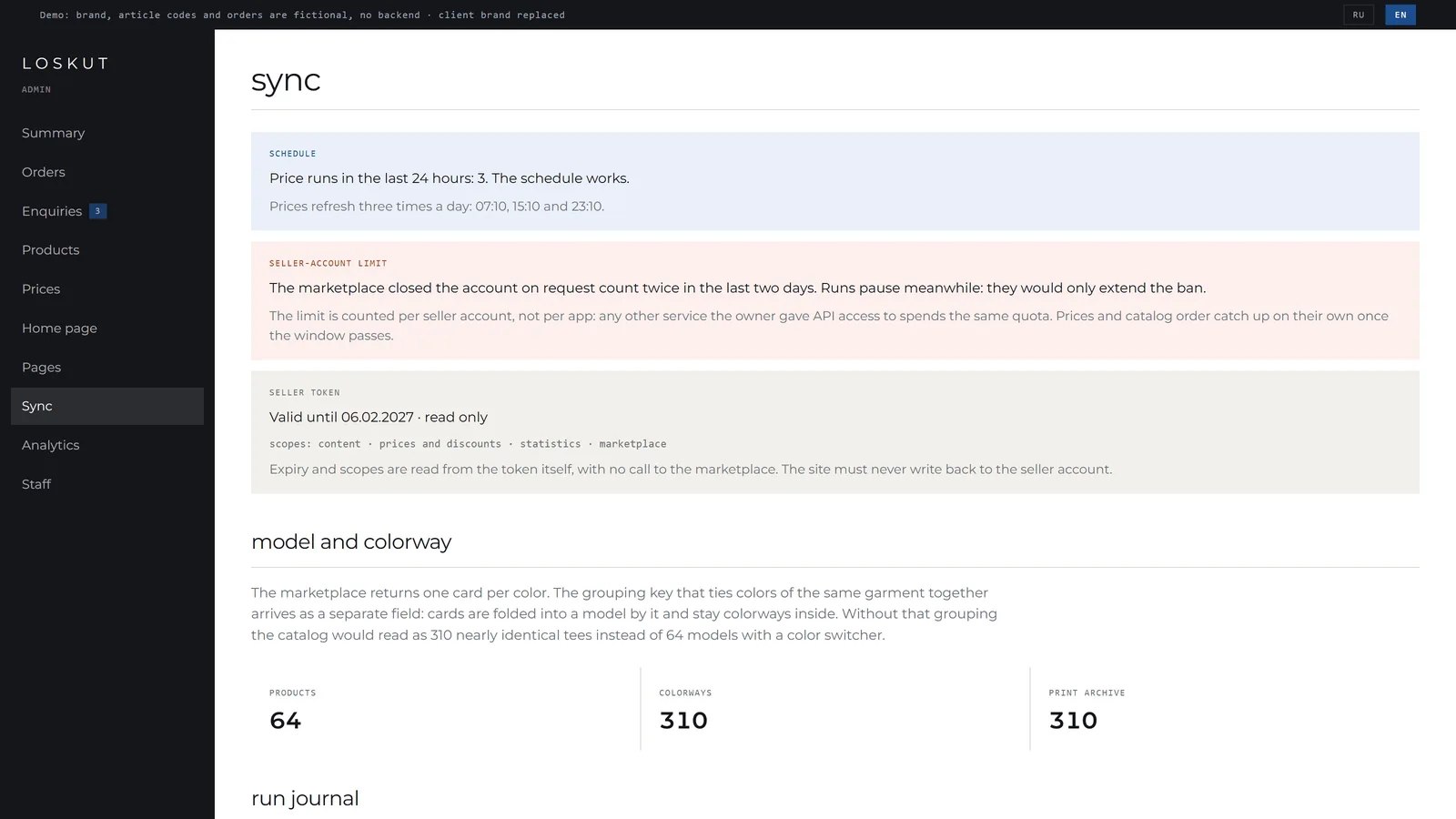
Sync screen in the admin panel: schedule health, account rate-limit pause, token scopes and expiry, journal of the latest runs
The sync screen answers one question: is the schedule working. There is deliberately no run button - a full catalog load takes minutes and hits platform limits, and a web request does not live that long.
Why this is on screen and not in logs

The limit is spelled out for the owner

The rate-limit pause, the token scopes and expiry, the number of runs in the last day and a journal of the last twelve runs sit on their own admin page. Without that, a throttled account reads as a broken site or an expired token, and the owner calls the developer instead of waiting it out.
04 Money

Site price and the loyalty-discount trap

The owner wanted something simple: cheaper on the site than on the platform. That reads as unambiguous right up to the moment you ask which price the buyer actually sees on the marketplace listing.

+
Seller price after the seller's own discountthe only price the API reports honestly
-
Loyalty discount funded by the platformthe marketplace pays it, the API does not expose it, the listing shows it
=
The listing price on the marketplacethe number the buyer compares ours against
!
"10% cheaper" technically means "10% below the seller price"a buyer comparing against the listing could see a higher price on our site

I.The price rule has a base

It can compute from the seller price or from the marketplace listing price. The base is chosen by the owner rather than hardcoded, which turns "cheaper than on the marketplace" into a checkable promise.

II.The rule lives in settings, not in code

The value in code is a fallback for an empty database only. The owner sets the rule in the admin panel, and all three runs read it. If even one computed from code, sync would revert prices to the old percentage and the edit would undo itself.

III.A malformed field does not stop the run

Parsing silently swaps a broken value for the fallback. A nightly run must not stall over a typo in one number, otherwise prices fall a day behind the platform.

IV.Prices and popularity are decoupled

While popularity was computed inside a successful price run, every rate-limit refusal left the catalog in yesterday's order, even though the platform was serving orders perfectly. They are two independent commands now.

05 Catalog

Model and colorway: 307 cards become 64 products

The marketplace returns a separate card per color. The key that ties colors of one garment together arrives as its own field: cards are folded into a model by it and stay colorways inside, behind a switcher. Without that grouping the storefront would read as three hundred nearly identical tees.

DecisionHowWhy
Colorway name taken from the seller article code, the attribute is the fallback In the Color attribute the platform lists every color present in the print: a tee with lemons carries four values. That describes the picture, not the variant.
Product title word for word as on the platform A buyer arriving from the marketplace has to recognise the item by name. A shortened form is needed in exactly one place, the page URL.
Colorway order ascending by card id The platform returns cards in update order. Without explicit sorting the colors would reshuffle on the storefront after every sync.
Photos copied to our storage, the platform URL stays the matching key Swapping the URL for a local path is not an option: the next run would treat every frame as gone from the card and delete them along with the ordering and the hide flags.
Frame ordering sync touches the set, never the order Order and hidden frames were set by staff. The order used to be rewritten by every run, and the arrangement reverted to the platform's own within a night.
Zero-stock size stays on the page, struck through A size that disappears reads as "not for me". A struck-through one says the garment exists in that size and may come back.
Key mechanism

Field locks: the human edit outranks the nightly run

Staff edits a title or a description, the field gets a lock, and sync stops rewriting it. This is what keeps the admin panel from being decorative: without locks any manual edit would live until the next night, and the owner would stop editing altogether.

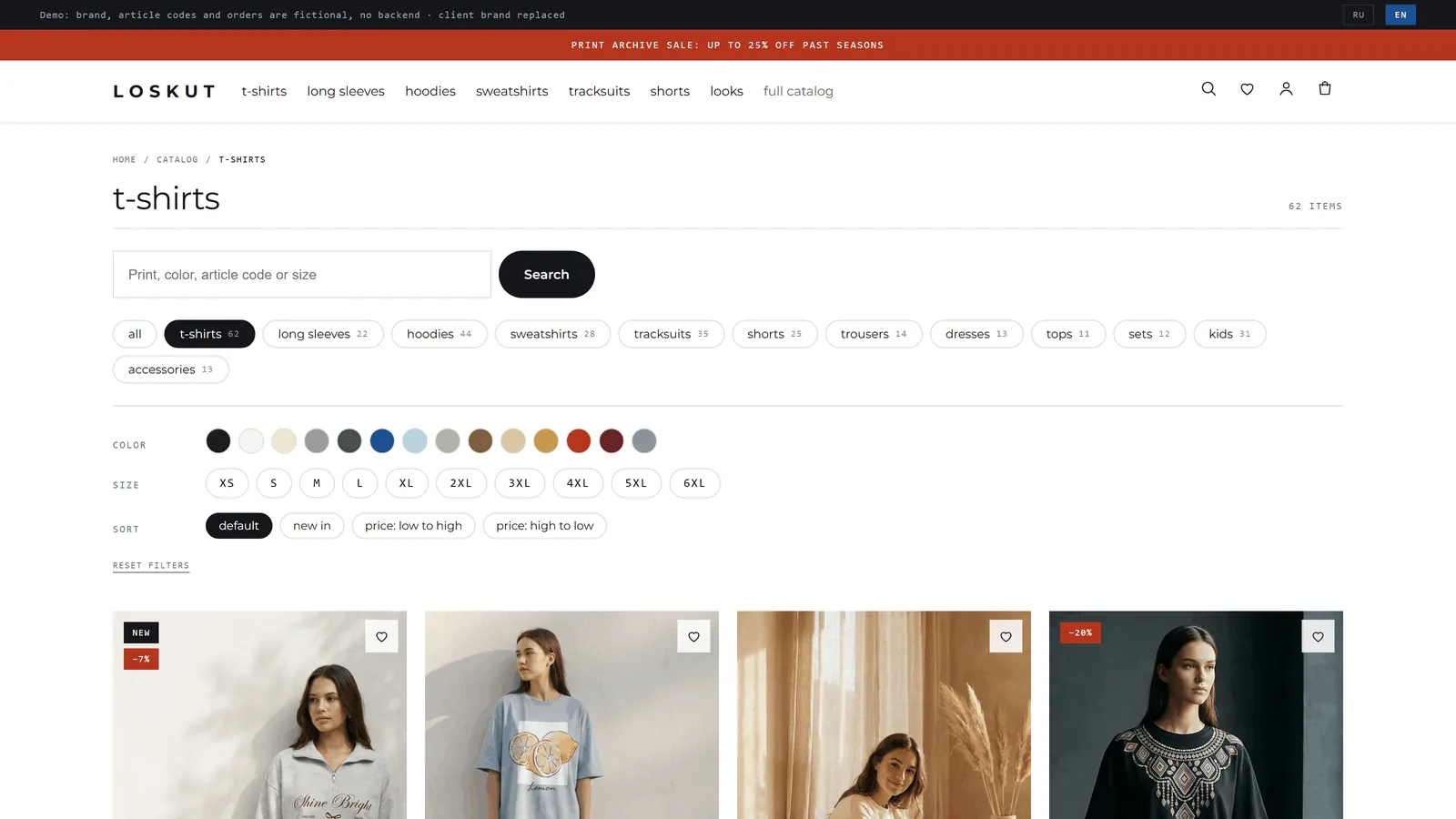
Catalog: sections with variant counts, color filter as swatches, letter and numeric sizes, four sort options, product grid
Facets are computed within the selected section: accessories never come in 4XL, so there is no reason to offer it there.
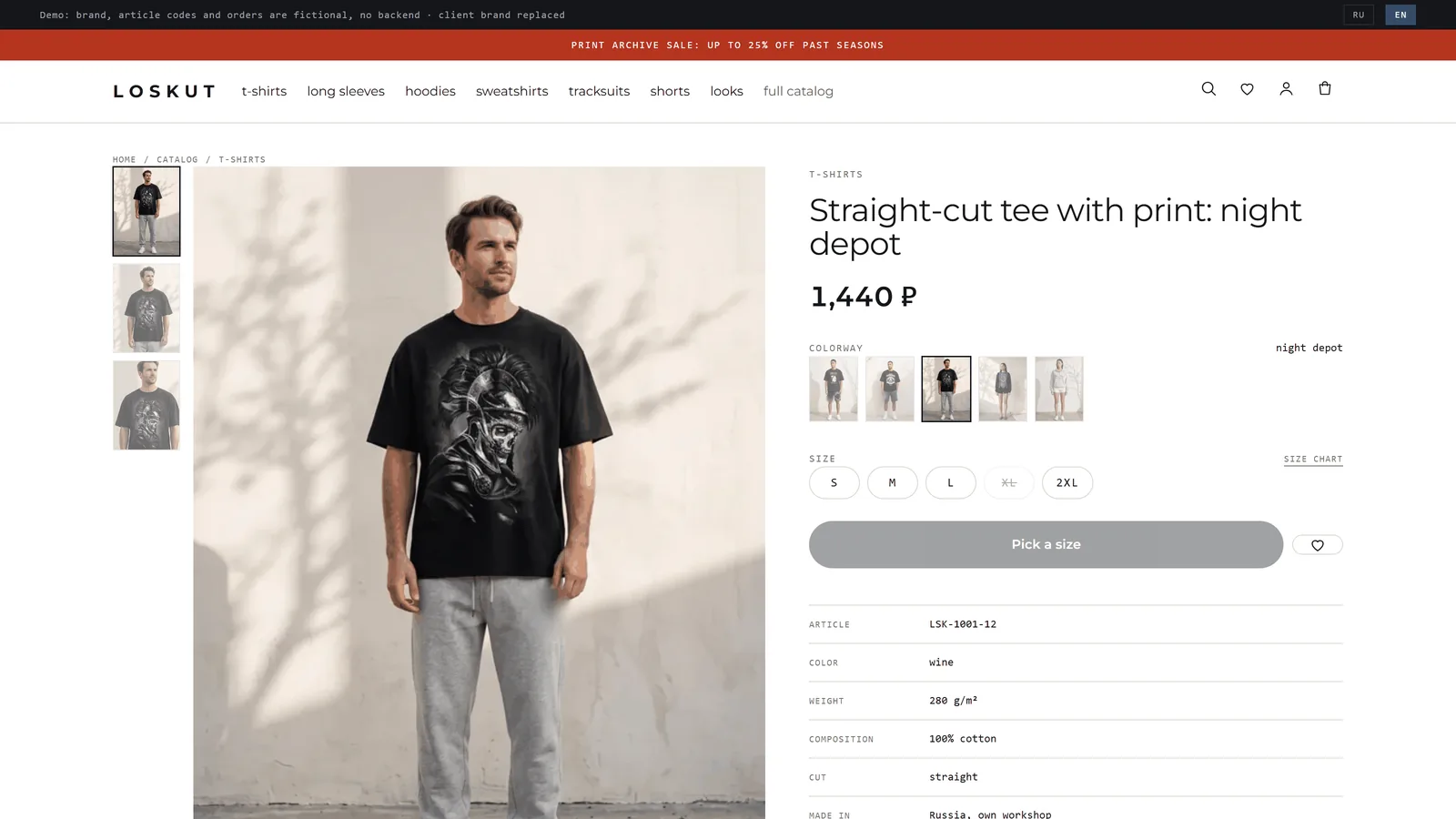
Product page: gallery with thumbnails, colorway switcher, sizes with stock, specifications set in monospace
The colorway switcher works inside the grouping, and specifications are set in monospace: a spec sheet, not marketing copy.
Art direction

The workshop and the sheet of paper

The brand has its own production and an archive of three hundred plus prints, so the site is built as a swatch catalog rather than a lookbook: white paper, press blue as the only accent, zero corner radius. Three typefaces split the work between brand voice, body text and data. Article codes, sizes, fabric weight and print names are set in monospace, which is exactly how a swatch catalog reads. The signature element is the print ticker under the first screen: colorway names scroll past and state the scale of the archive in names rather than in a number.

Home page: full-screen frame, lowercase headline, ticker of print names under the first screen
The home page is assembled from blocks stored in the database: the owner adds, reorders and configures them in the admin panel, and the page only reads them in order.
06 Admin panel

An owner's tool, not a developer's console

Sections differ by role, and access is decided by each page itself. That is not the only line of defence: server actions check the permission a second time, because an action is callable directly over HTTP and the shell check never runs in that case.

I.Summary

What needs action first: colorways without a price, new orders, sizes at zero stock. General numbers after that, and only the ones the role may see: revenue is the owner's money, not a public stat.

II.Orders

List, detail, status changes along permitted transitions only. Contact-form enquiries sit in the same section: they carry personal data and the same person answers them.

III.Products

Search, title and description editing, prices per colorway, stock per size, hiding frames, and field locks that keep sync from overwriting the work.

IV.Inline edit mode

A frame around the page, text edited in place, save and undo buttons. Undo works off a journal of previous values rather than off tab memory.

V.Home page builder

Home page blocks live in the database. The page does not know what it is made of: it reads the blocks in order and fetches in one pass whatever they need from the catalog.

VI.Telegram alerts

An order lands in the work chat over a webhook. Queue, reminders and cleanup run as a separate scheduled command every ten minutes, so an unreachable messenger never breaks checkout.

VII.Orders: the status changes in the row

The list offers the status as a select right in the row: there is no need to open a card for a single transition. The card holds what people actually open it for: the lines, delivery, payment and history.

VIII.Content under one menu item

The home page, pages, documents and social links sit under a single menu item. They used to be four separate rows and the menu fell apart.

IX.Analytics with ecommerce

Two counters, a funnel and goals. A product view counts once per visit, not twice: the event hangs on the card, not on every render.

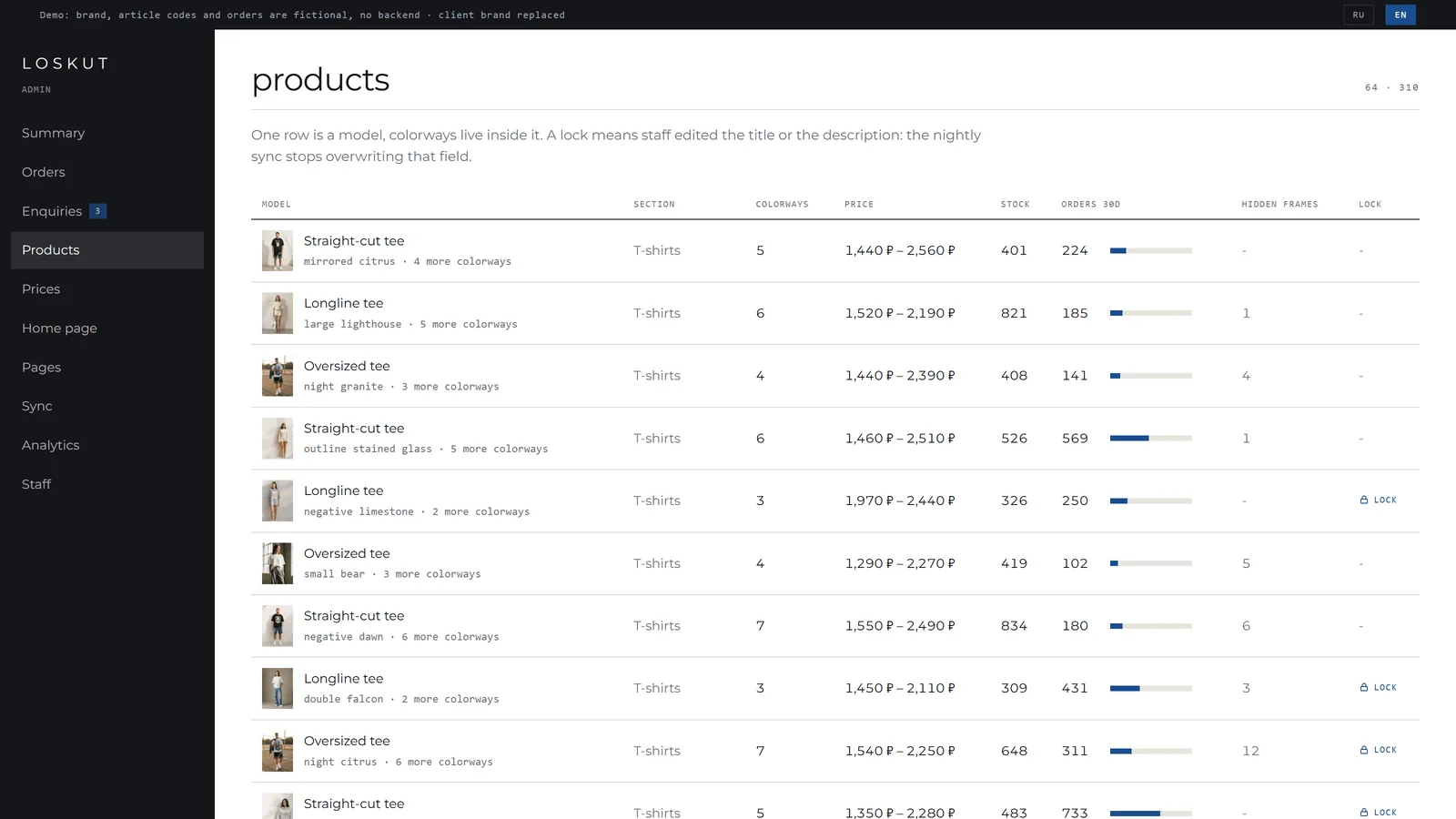
Products section in the admin panel: model with its lead print, colorway count, price range, stock, 30-day orders with a bar, hidden frames and the field lock
One row is a model, colorways live inside it. A lock means staff edited the field and the nightly sync leaves it alone.
07 Payment and delivery

An order is taken all the way to the money and to the door

Checkout no longer ends with an email to a manager. The customer picks a delivery service and a pickup point on a map right at checkout, pays by card or by instant transfer, and the operator prints the waybill from the admin and watches statuses that arrive on their own.

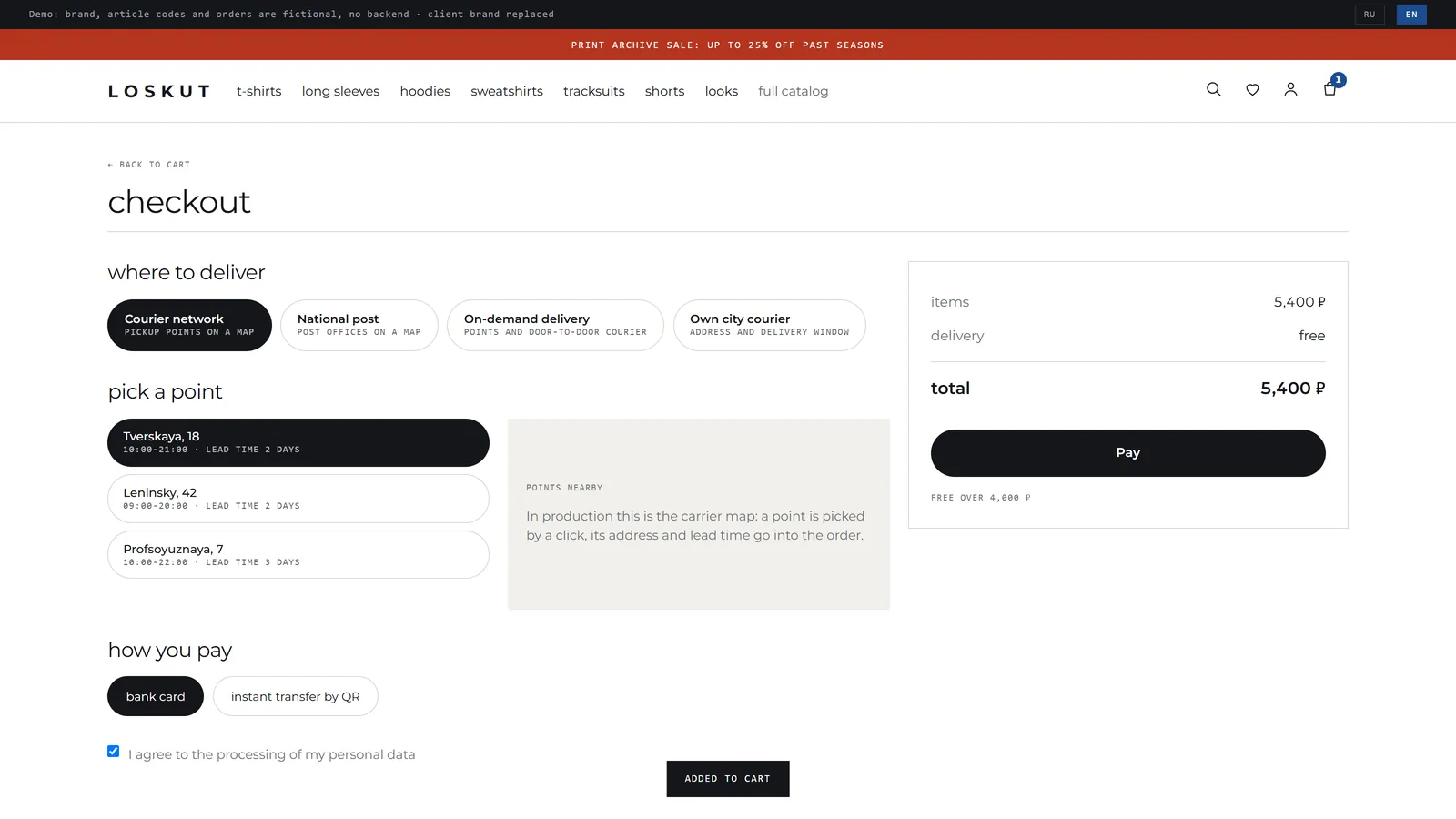
Checkout: delivery service, pickup point on a map, payment method and the data processing consent
Checkout: four delivery options, a pickup point with its address and lead time, card or instant transfer, and the data processing consent as a checkbox.

I.Bank acquiring

Payment by card and by instant transfer through a QR code. Bank notifications hit our own endpoint, the signature is verified, and an order changes state only on a confirmed notification, never on the customer returning to the site.

II.Refunds

A button on the order card returns the money by the same method it came in. The payment status never moves backwards: it moves forward into the refunded state. A customer can cancel a fresh order themselves and the money goes back without an operator.

III.Three delivery services

A courier network with pickup points on a map and a waybill from the admin, the national post with a parcel created from the office index and its own label, and an on-demand service with a request and polled statuses.

IV.Statuses arrive on their own

One service has webhooks, another has scheduled polling: whatever each one offers. The operator does not walk around carrier portals, they see the tracking number and the state in the order row.

V.A refusal speaks in the carrier's words

If a service refused to print a label, the operator sees its wording, not a bare error code. Otherwise the investigation turns into a support thread while the order waits.

VI.Data processing consent

A checkbox on sign-up and at checkout, stored together with the order. It is not decoration: without it you may neither write to the customer nor hand their address to a carrier.

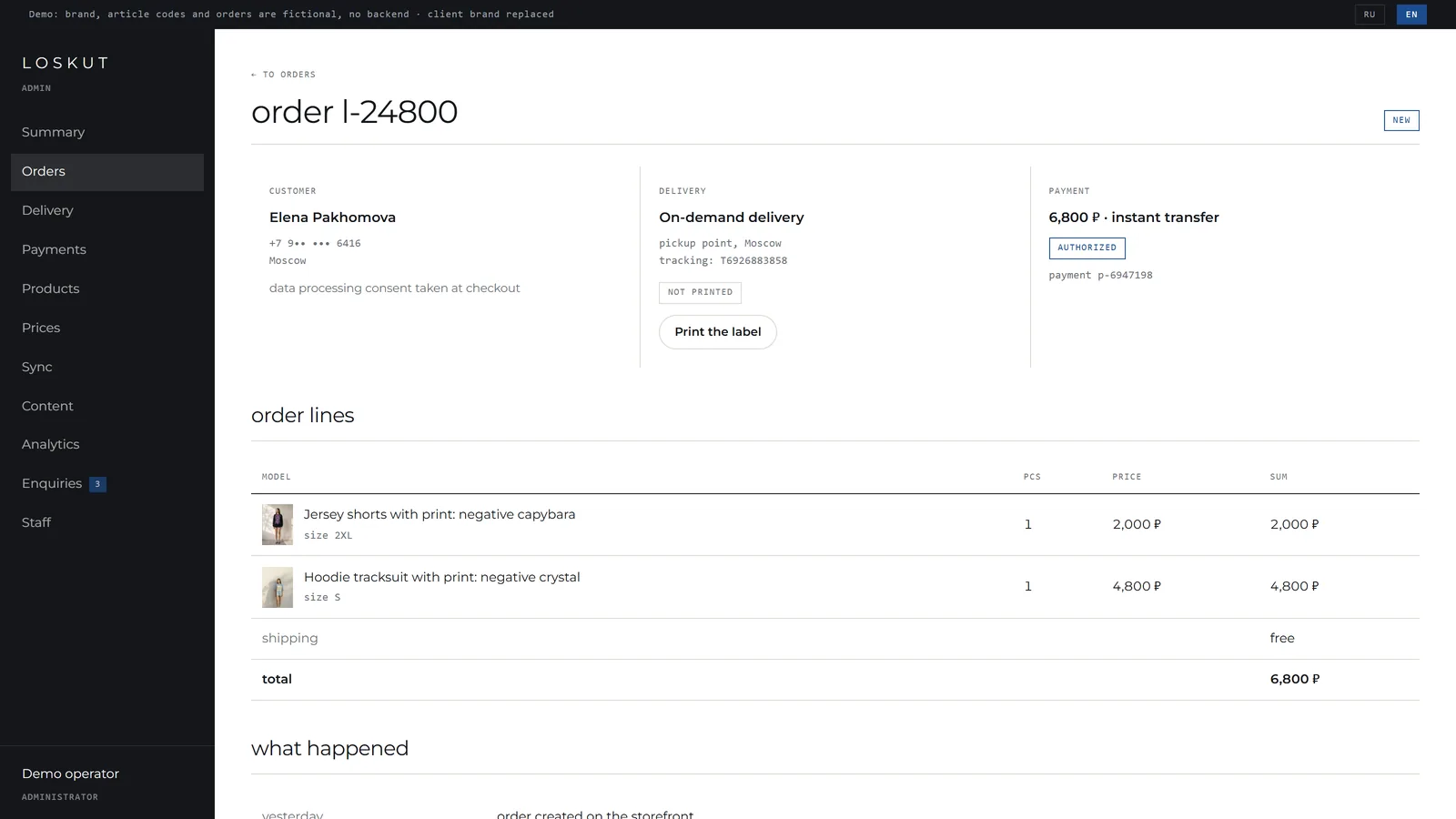
Order card: customer, delivery with tracking and label, payment with a refund, lines and history
The order card: the customer, delivery with tracking and label, payment with a refund button, the lines and the history of what happened.
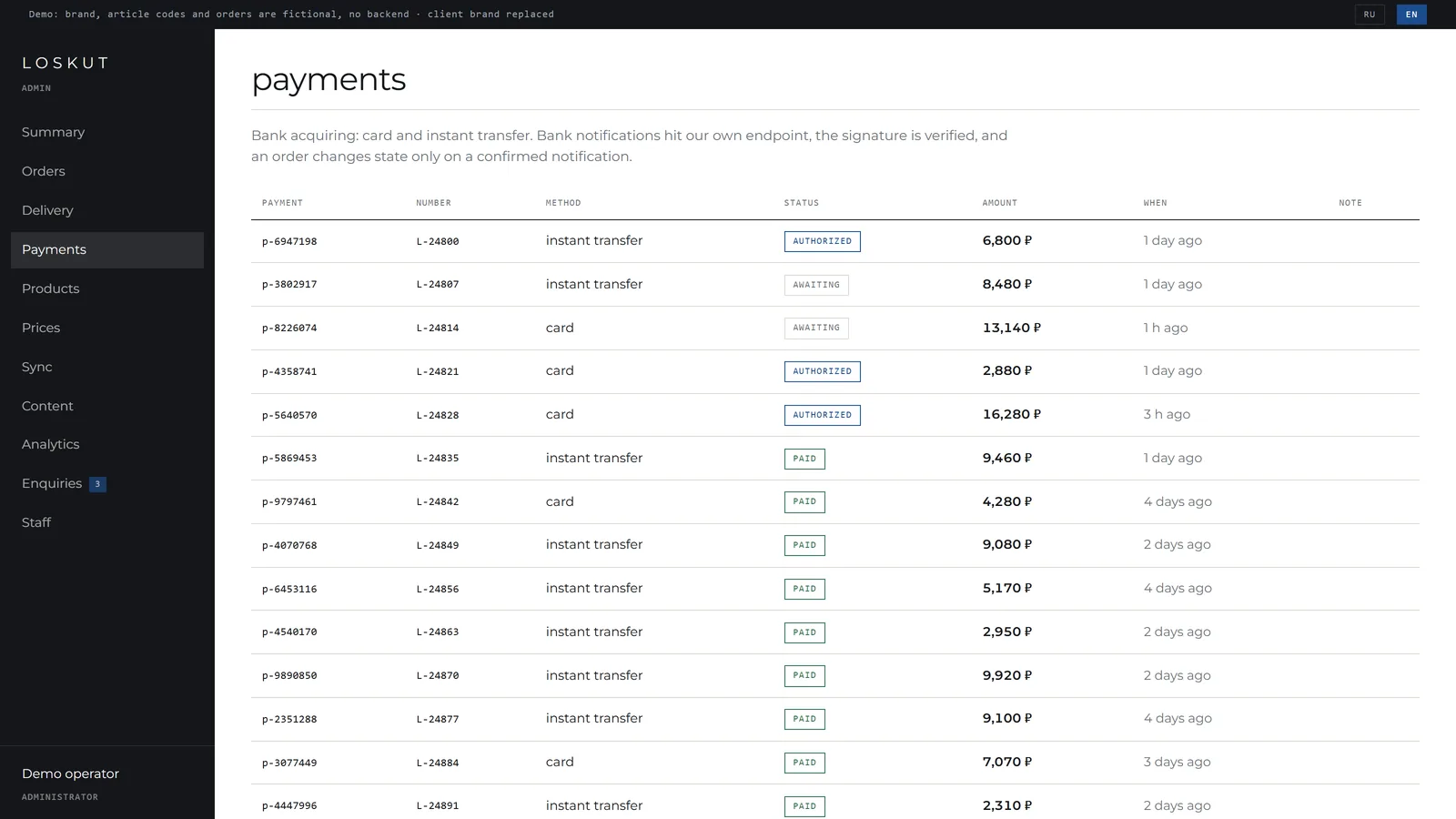
Payments journal: method, status, amount and a note
The payments journal: method, status, amount and a note. A bank refusal is spelled out in words, not in a code.
08 How it was built

Code split by domain, decisions recorded next to the code

9domain modules
312TypeScript files
1,356automated tests
73test files
26migrations

I.Code is split by domain

One module, one folder, its own README, its own tests next to the code. The module boundary is its index file: importing another module's internals is not allowed. If you need to, the public API is missing something, and that is where it goes.

II.The README is written before the code

Not what the code does, that is visible from the code, but which decisions were taken and why. Half the findings in the sync section live there, so the next person does not step on them again.

III.Tests next to the code

The rules file and its test file share a folder. You can see what is covered and what is not, and the test travels with the code. Tests never touch the network: the HTTP client takes its fetch from outside.

IV.A separate test database

The harness swaps the database URL before the client is created and fails if the URL does not carry the test name. Without that check one bad run would wipe the development catalog.

V.Checks run on the server

Tests, types and the build run on a separate copy of the project with a separate database. A local database is no longer needed, and the production shop is never touched.

VI.One-command deploy

A deploy script, an auto-renewing certificate, redirects from www and from the raw server address to the canonical domain. The run schedule lives in the system scheduler, not inside a web request.

About those numbers

Thirteen hundred tests is not heroics

It is what happens when pure rules are separated from database and network work. Card mapping, price computation, order status transitions, price-rule parsing, colorway grouping: all of them are side-effect-free functions, and a test for one is cheap. The expensive end-to-end checks stay where nothing else will do.

09 Result

Before and after

WhatBeforeAfter
Cataloginside the marketplace account only307 colorways on the brand's own site, refreshed automatically
Pricesmoved on the platform, no direct siterecomputed three times a day under the owner's rule
Product order-by 30-day order count, history accumulates on its own
Catalog editingthrough the platform account onlyadmin panel with field locks, edits survive the night
Photosserved by the marketplace CDN4,478 frames hosted by the brand
Orders-checkout, statuses, Telegram notification
Platform limitsrefusals looked like a broken siteexplained on screen in words, runs wait on their own

The store runs in production on its own domain, with a certificate and auto-renewal. Catalog, prices and product order refresh on a schedule with no human in the loop. The owner edits the storefront and the orders himself. The next stage, payments and shipping, is split off deliberately and scoped as a separate assignment.

Kirill Sedov

Business analysis and automation: ERP systems, dashboards, marketplace integrations and AI agents. Former COO of a company doing 4 million dollars a month, now building these systems for clients.

Message me on LinkedIn